> ## Documentation Index
> Fetch the complete documentation index at: https://learn.clicks.tech/llms.txt
> Use this file to discover all available pages before exploring further.
# Meet Clicks for Razr: A keyboard you’ll flip for.
Clicks for the Motorola Razr transforms the foldable experience — unlocking full-screen productivity while keeping Razr ultra-pocketable. Best of all, Clicks adds a real keyboard that lets you type, navigate, and take control — all from the external display.
Optimized for the Motorola Razr+ (2024), Clicks is also compatible with the base Motorola Razr (2024). Clicks for Razr comes in two colors as unique as your flip itself – Electric (blue) and Onyx (Black).
Be sure to watch the video above for an introduction to Clicks for Razr and read on for some of our favorite highlights.
## 1. Pocketable productivity
Clicks makes Razr+ even more powerful by combining the largest and smartest external display on a foldable with the benefits of real buttons. With Clicks, you don't have to flip open your phone to get things done:
* Wake and unlock the external screen at the push of a button
* Maximizes all 4" of the external display by moving the keyboard off the screen
* Gives you a huge canvas for content and creation when flipped open
## 2. Premium typing experience
The best mobile keyboard yet, with buttons designed to help you type faster, longer and more accurately.
* Ergonomically contoured keys for comfort
* High quality metal dome switches for satisfying tactile feedback
* Backlit keys for night-time and low-light typing
## 3. Ultimate control in the palm of your hand
Launch Google Gemini instantly, open your favorite apps, and even snap hands-free selfies at the push of a button. Here are a few of our favorite shortcuts; for a full list, check out this article.
Take selfies with the help of the external display using the return key as a capture button
* Launch apps instantly from the external display like:
* Search + G = Gmail
* Search + Y = YouTube
* Search + K = Calendar
* Dedicated Gemini key – Access Google AI instantly
* Search + Backspace = Go back
* Even more shortcuts when your Razr is flipped open:
* Search + N = Open notifications
* Alt + Clicks = Switch recent apps
* Navigate Razr with real buttons:
* Search = Open app drawer
* Search + Return = Home
We couldn't be more excited to bring the award-winning Clicks Keyboard to Android. For more info, be sure to watch the [launch video](https://www.youtube.com/watch?v=HoSf21Arj8A) from MrMobile himself!
### Read more
Clicks brings its award-winning iPhone keyboard case to Google, Motorola and Samsung smartphones. Smart keyboard accessory offers a premium typing experience, added screen real-estate and powerful keyboard shortcuts. Available to pre-order today from USD \$49.
Since launching Clicks for iPhone in 2024, we've heard from passionate Pixel owners that they want the benefits of buttons. With the announcement of Clicks for Pixel, we're giving pixel a productivity power-up.
The Clicks Keyboard for Android is here. Learn how to use keyboard shortcuts to launch apps and navigate your Android phone.
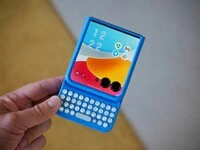 Clicks makes Razr+ even more powerful by combining the largest and smartest external display on a foldable with the benefits of real buttons. With Clicks, you don't have to flip open your phone to get things done:
* Wake and unlock the external screen at the push of a button
* Maximizes all 4" of the external display by moving the keyboard off the screen
* Gives you a huge canvas for content and creation when flipped open
## 2. Premium typing experience
Clicks makes Razr+ even more powerful by combining the largest and smartest external display on a foldable with the benefits of real buttons. With Clicks, you don't have to flip open your phone to get things done:
* Wake and unlock the external screen at the push of a button
* Maximizes all 4" of the external display by moving the keyboard off the screen
* Gives you a huge canvas for content and creation when flipped open
## 2. Premium typing experience
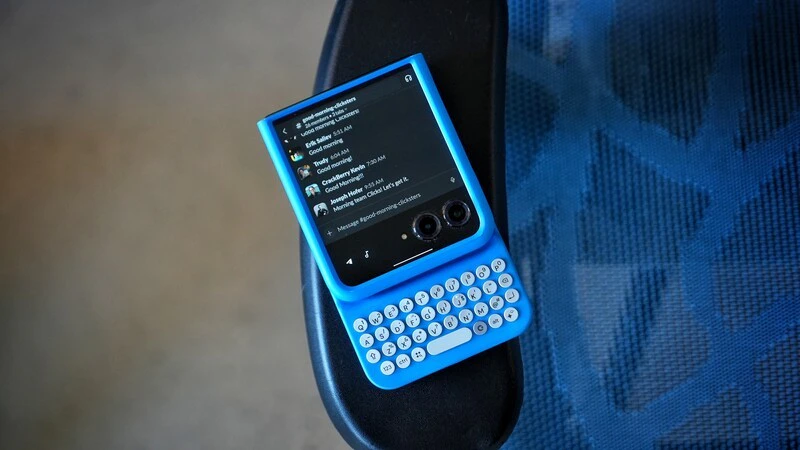 The best mobile keyboard yet, with buttons designed to help you type faster, longer and more accurately.
* Ergonomically contoured keys for comfort
* High quality metal dome switches for satisfying tactile feedback
* Backlit keys for night-time and low-light typing
## 3. Ultimate control in the palm of your hand
The best mobile keyboard yet, with buttons designed to help you type faster, longer and more accurately.
* Ergonomically contoured keys for comfort
* High quality metal dome switches for satisfying tactile feedback
* Backlit keys for night-time and low-light typing
## 3. Ultimate control in the palm of your hand
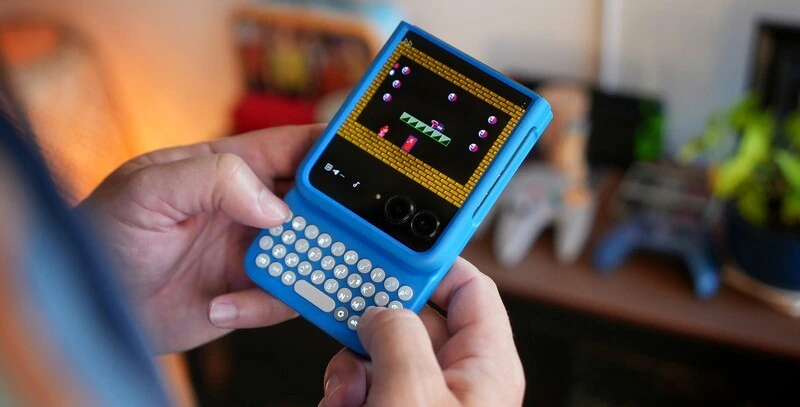 Launch Google Gemini instantly, open your favorite apps, and even snap hands-free selfies at the push of a button. Here are a few of our favorite shortcuts; for a full list, check out this article.
Take selfies with the help of the external display using the return key as a capture button
* Launch apps instantly from the external display like:
* Search + G = Gmail
* Search + Y = YouTube
* Search + K = Calendar
* Dedicated Gemini key – Access Google AI instantly
* Search + Backspace = Go back
* Even more shortcuts when your Razr is flipped open:
* Search + N = Open notifications
* Alt + Clicks = Switch recent apps
* Navigate Razr with real buttons:
* Search = Open app drawer
* Search + Return = Home
We couldn't be more excited to bring the award-winning Clicks Keyboard to Android. For more info, be sure to watch the [launch video](https://www.youtube.com/watch?v=HoSf21Arj8A) from MrMobile himself!
### Read more
Launch Google Gemini instantly, open your favorite apps, and even snap hands-free selfies at the push of a button. Here are a few of our favorite shortcuts; for a full list, check out this article.
Take selfies with the help of the external display using the return key as a capture button
* Launch apps instantly from the external display like:
* Search + G = Gmail
* Search + Y = YouTube
* Search + K = Calendar
* Dedicated Gemini key – Access Google AI instantly
* Search + Backspace = Go back
* Even more shortcuts when your Razr is flipped open:
* Search + N = Open notifications
* Alt + Clicks = Switch recent apps
* Navigate Razr with real buttons:
* Search = Open app drawer
* Search + Return = Home
We couldn't be more excited to bring the award-winning Clicks Keyboard to Android. For more info, be sure to watch the [launch video](https://www.youtube.com/watch?v=HoSf21Arj8A) from MrMobile himself!
### Read more