> ## Documentation Index
> Fetch the complete documentation index at: https://learn.clicks.tech/llms.txt
> Use this file to discover all available pages before exploring further.
# 3 Ways to Manage Music with Clicks Mode Shortcuts
> Learn how to customize your keyboard to play playlists, ID songs and enable wired CarPlay
We may earn a commission for purchases using our links. [Learn more](https://discover.clicks.tech/terms-and-conditions).
Whether you're getting into a flow state to tackle some deep work, about to hit the gym to break a sweat, or are heading out in the car, great tunes can make all the difference.
Using [Clicks Mode](/not-a-part-of-google-sheet/how-turn-clicks-keyboard-iphone-remote-control-your-life) together with keyboard shortcuts can help you take control over your music at home, on the go and in the car. Here are a few of our favorites.
## 1. Play a playlist on your smart speaker
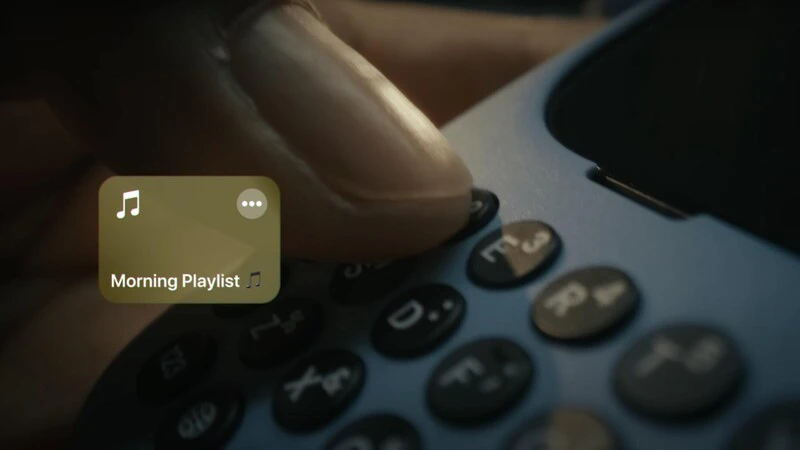 Clicks Mode makes it easy to start your favorite playlist for any task throughout your day.
Different playlists can be mapped to different Action buttons allowing you to jump into the music that suits your mood.
Clicks + G can launch your gym playlist to help you get pumped up. Clicks + D could start your down tempo playlist for deep work
You could even go a step further and build your shortcut to configure the audio playback location for that playlist, allowing you to listen in a specific room in your house.
## 2. Name that tune with Shazam
Clicks Mode makes it easy to start your favorite playlist for any task throughout your day.
Different playlists can be mapped to different Action buttons allowing you to jump into the music that suits your mood.
Clicks + G can launch your gym playlist to help you get pumped up. Clicks + D could start your down tempo playlist for deep work
You could even go a step further and build your shortcut to configure the audio playback location for that playlist, allowing you to listen in a specific room in your house.
## 2. Name that tune with Shazam
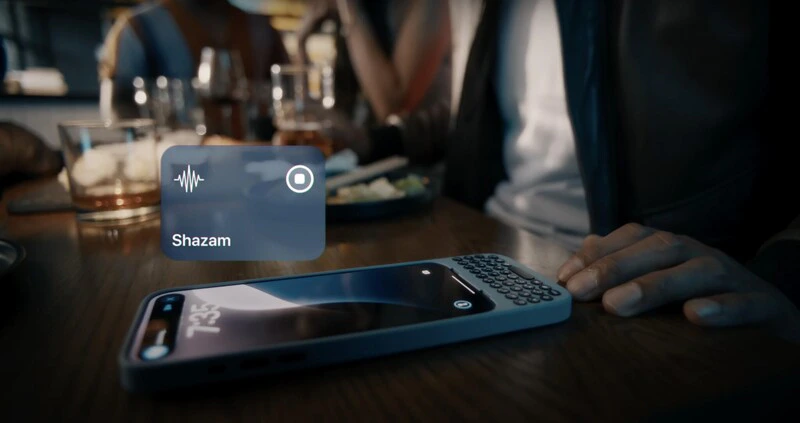 When you hear a song that piques your interest, apps like Shazam make it easy to name the track and artist…if you can act fast enough before the song ends.
A Clicks Mode shortcut (like 'Clicks + S') can allow you to start listening for the song that's playing without even unlocking your phone.
The track ID can be displayed in Dynamic Island or on your lock screen.
## 3. Give your drive a soundtrack with CarPlay
When you hear a song that piques your interest, apps like Shazam make it easy to name the track and artist…if you can act fast enough before the song ends.
A Clicks Mode shortcut (like 'Clicks + S') can allow you to start listening for the song that's playing without even unlocking your phone.
The track ID can be displayed in Dynamic Island or on your lock screen.
## 3. Give your drive a soundtrack with CarPlay
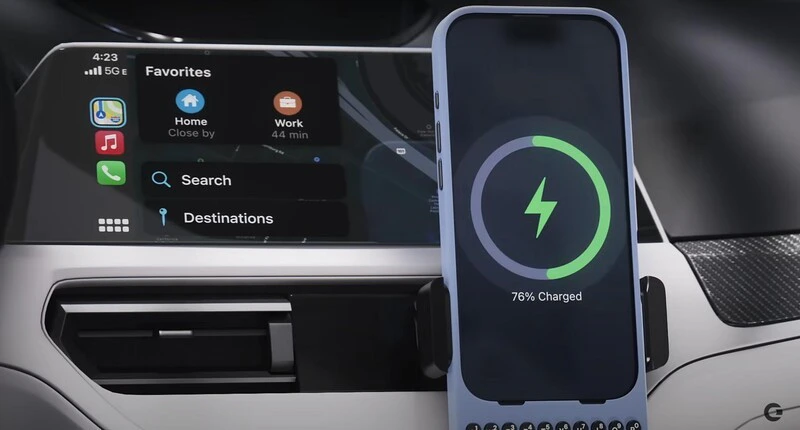 A growing number of cars support Apple CarPlay allowing you to get directions, make calls, send and receive messages, and enjoy your favorite music, all on your car's built-in display.
Clicks for iPhone 16 introduces a new data passthrough mode\*\* that lets you connect your iPhone to CarPlay using a USB-C cable, without removing your iPhone from your keyboard case.
Press and hold the 123 key and tap the spacebar. This will put your Clicks Keyboard into USB-C data passthrough mode. Now connect your phone to CarPlay by plugging in your USB-C cable. Your phone will connect to CarPlay.
While in USB-C data mode the keyboard will not support text input (think of this as an added safety feature to deter texting and driving!). To resume regular keyboard mode simply unplug the USB-C cable.
\*\* make sure to have the latest version of the [Clicks Keyboard App](https://apps.apple.com/gb/app/clicks-keyboard/id6466761655) in App Store and have updated your Clicks Keyboard for iPhone 16 firmware to the latest version.
### Read more
The 36 buttons on your Clicks Keyboard can be used for so much more than just typing. By enabling Clicks Mode to work with iOS Shortcuts, you can use the buttons on your Clicks Keyboard to quickly launch apps, trigger workflows or take actions you perform frequently
With Clicks you will find that many of the keyboard shortcuts you use on your Mac or iPad Magic Keyboard work on your iPhone.
With just a bit of practice your thumbs will feel right at home, typing with confidence and unlocking new iPhone features only available with a keyboard.
Discover what's new in the Clicks Keyboard for the iPhone 16.
A growing number of cars support Apple CarPlay allowing you to get directions, make calls, send and receive messages, and enjoy your favorite music, all on your car's built-in display.
Clicks for iPhone 16 introduces a new data passthrough mode\*\* that lets you connect your iPhone to CarPlay using a USB-C cable, without removing your iPhone from your keyboard case.
Press and hold the 123 key and tap the spacebar. This will put your Clicks Keyboard into USB-C data passthrough mode. Now connect your phone to CarPlay by plugging in your USB-C cable. Your phone will connect to CarPlay.
While in USB-C data mode the keyboard will not support text input (think of this as an added safety feature to deter texting and driving!). To resume regular keyboard mode simply unplug the USB-C cable.
\*\* make sure to have the latest version of the [Clicks Keyboard App](https://apps.apple.com/gb/app/clicks-keyboard/id6466761655) in App Store and have updated your Clicks Keyboard for iPhone 16 firmware to the latest version.
### Read more
The 36 buttons on your Clicks Keyboard can be used for so much more than just typing. By enabling Clicks Mode to work with iOS Shortcuts, you can use the buttons on your Clicks Keyboard to quickly launch apps, trigger workflows or take actions you perform frequently
With Clicks you will find that many of the keyboard shortcuts you use on your Mac or iPad Magic Keyboard work on your iPhone.
With just a bit of practice your thumbs will feel right at home, typing with confidence and unlocking new iPhone features only available with a keyboard.
Discover what's new in the Clicks Keyboard for the iPhone 16.